


Give every leader back hours of their day.
Enterprise Assistant does the prep, follow-up and admin your people do by hand, builds a private memory of everything your company discusses, and coaches every team from its own conversations — all inside your own cloud.
Meeting prep, recaps, CRM updates and reporting done for you. Leaders get hours back, not more dashboards.
See a day with Enterprise Assistant →Every meeting, decision, person, account and project linked in a knowledge graph your whole company can ask.
How the memory works →Personal coaching for every rep and manager, and patterns from won and lost deals for leaders — from your own calls.
See coaching →Runs in your cloud or on-prem with your own LLM keys. Your conversations never leave your control.
Privacy and security →Every meeting creates 15–30 minutes of work before and after it. Enterprise Assistant takes that work across the whole day — and asks you to approve, not to type.
A one-page brief for every meeting: past conversations, open promises, stakeholders and deal stage. Your inbox, already sorted by what matters.
Enterprise Assistant joins Teams, Zoom, Meet or Webex and captures every decision and commitment, with an owner and a due date. You keep your eyes on the customer.
Recaps drafted, CRM updated, tasks assigned and the weekly roll-up written — waiting in one queue for your OK.
Pick a role and see the same day — before Enterprise Assistant, and with it.

Owns the number. Lives in forecast calls, deal reviews and board updates — and spends the hours in between chasing context.
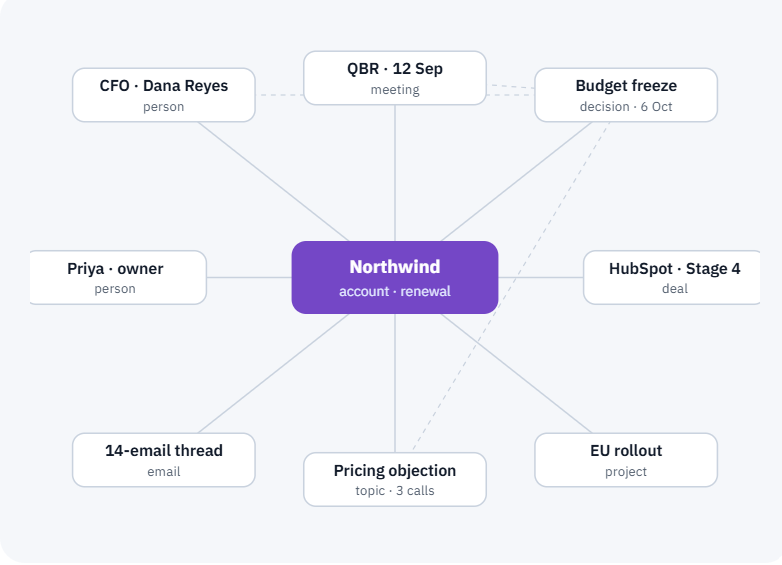
Most of what a company knows is said in meetings and lost by Friday. Enterprise Assistant turns every conversation into a living knowledge graph — linking people, accounts, decisions, projects, emails and CRM records — so anyone can ask what happened, and why.
Managers can sit in on a fraction of calls. Enterprise Assistant learns from all of them, then gives each person specific, private coaching — and gives leaders the patterns behind what wins.
An assistant that remembers everything must be trusted with everything. Your meetings, inboxes and deals are your most sensitive data. Enterprise Assistant is built for healthcare, financial services, legal and public-sector teams that cannot hand them to a third party.
Codvo-managed cloud, your private cloud or VPC, on-premise, or air-gapped.
Bring your own LLM keys. You own every recording, transcript and summary; no third-party access.
SSO/SAML, role-based access, full audit logs and retention you set from 7 to 365 days.
Credentials and personal data are detected and redacted from transcripts and summaries automatically.
People only find what they are allowed to see. Coaching is private to each person unless they share it.
Every outbound message and CRM change waits in one queue. Every insight links to its source.
Every capability draws on the same organisational memory of your meetings, inbox, calendar and CRM — so each one knows what the others know.
A one-page brief before every meeting: past conversations, open items, stakeholders and deal stage.
Ranks inbound email by deal priority and drafts replies, with yesterday's recaps already written.
Surfaces LinkedIn replies with the account's deal history and suggests your next message.
Joins Teams, Zoom, Meet or Webex and logs every decision and commitment with an owner and due date.
Links each committed deal to what the customer said on recent calls and flags gaps before the call.
Sends the recap and assigns tasks the moment a call ends — you approve in one click.
Writes next steps and stage changes into HubSpot or Salesforce, and flags deals showing risk.
Finds ICP-matched contacts, researches each one and drafts personalised outreach for approval.
Drafts the weekly forecast narrative and week-in-review from every meeting and deal.
Links people, accounts, decisions, projects, emails and CRM records; ask anything and get answers with sources.
Private coaching for every rep after each call, and win-loss patterns for managers and leaders.
Scores every meeting on clear decisions, owners, balanced participation and open loops.
Deploy in your cloud or on-prem and switch on SSO. Connect calendars, meeting platforms, email, HubSpot or Salesforce, and Teams or Slack. Load deal stages, your ICP and the risk signals to watch.
Choose which meetings Enterprise Assistant joins, when your Morning Brief arrives, how approvals work and who receives your weekly roll-up. Optionally connect LinkedIn.
Read your Morning Brief, clear the approval queue twice a day, and let Enterprise Assistant handle the rest. Nothing is sent and no CRM field changes without your OK.
Move the sliders to match your team. Estimates use 46 working weeks and a $50 loaded hourly cost.
No. Notetakers stop at the transcript. Enterprise Assistant works across your whole day — preparing you before meetings, capturing decisions during them, and doing the follow-up, CRM updates and reporting afterwards.
Wherever you choose: Codvo-managed cloud, your private cloud or VPC, on-premise or air-gapped. You can bring your own LLM keys, and no third party has access to your meetings, email or CRM data.
Only if you let it. By default every outbound message and CRM change waits in an approval queue. Admins can allow auto-send for specific actions once your team trusts the drafts.
The knowledge graph lives inside your own deployment and follows your access rules: people only find meetings, emails and records they are allowed to see. Sensitive data is redacted, and nothing is shared with Codvo or any third party.
After each call, Enterprise Assistant gives the person private feedback: talk balance, questions asked, next steps and one thing to try. Managers see team trends and can review shared calls; leaders see what top performers do differently.
CROs, sales leaders, account executives, customer success leads and managers of any team that runs on meetings. Each role gets its own Morning Brief and capabilities.
An IT admin connects your systems in about half a day. Each person then personalises Enterprise Assistant in about 15 minutes.
A 30-minute walkthrough on your own meetings, in your own environment.